Folder Weather is a Firefox extension that turns a bookmark toolbar folder into a live weather readout. Name a folder [w Rotterdam], and a moment later it’s called Rotterdam 24° and contains today’s weather as bookmark rows. One glance at your toolbar and you know whether to bring a coat.
It started as a daft idea: can you name a toolbar folder [w Rotterdam] and have Firefox fill it with the weather? Turns out yes. And after two months of using it every day, it turns out it’s also really nice.
How it looks
A folder named [w Rotterdam] becomes a folder called Rotterdam (or Rotterdam 24° if you enable the title readout) containing rows like:
☀️ 24°
feels 22°
→ 12 km/h
0 mm
Each row links to a Google weather search for the city, and the folder refreshes itself on a timer (every 15 minutes by default). Real bookmark separators sit between the rows, so it looks like it belongs there.
Two ways to add a city
Quick add
Make a bookmark toolbar folder and name it in the bracket syntax:
[w Rotterdam]                          uses your global default template
[w San Diego, CA :: {emoji} {temp}°]   custom template, pipes split rows
Within a moment the extension renames the folder to the plain city name and fills it with weather rows. The bracket form is a one-time “edit me” shortcut, not a permanent label.
Settings page
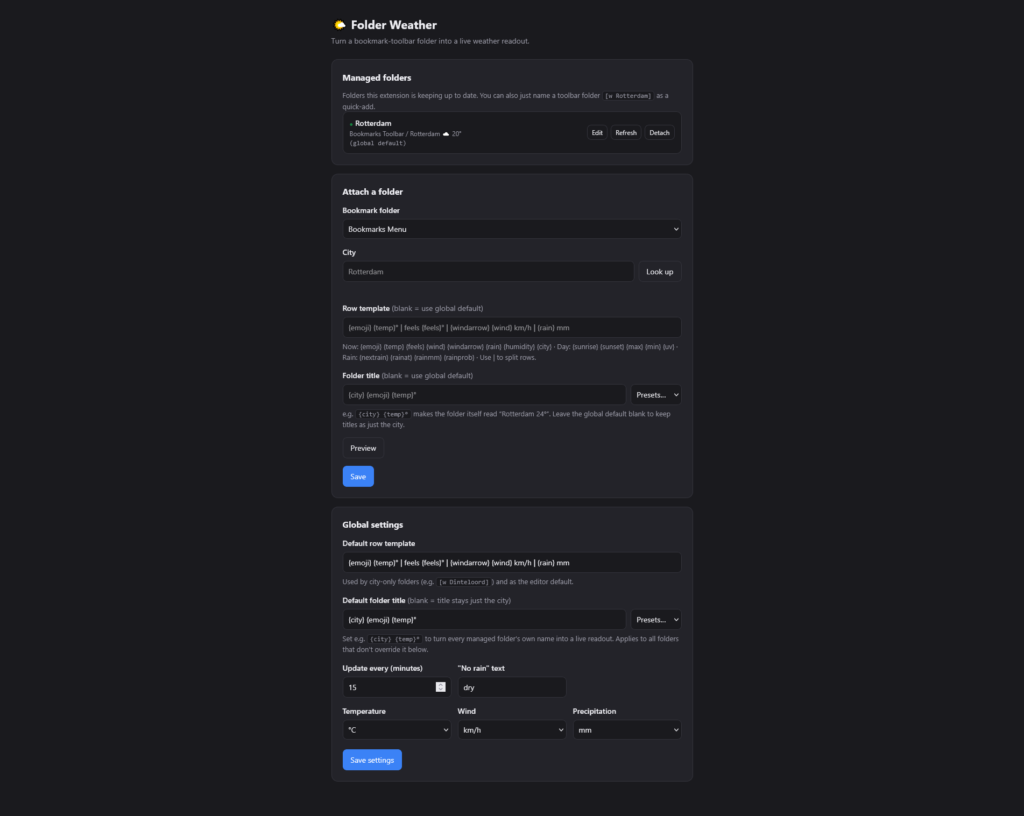
Open the extension’s preferences for a full editor: pick an existing folder, confirm the city with a geocode lookup, write a row template and an optional folder title, and see a live preview before you save. The settings page is the canonical source of truth; the bracket syntax is a convenience layer on top of it.
Template tokens
This is the part where you get to code your folder names. Type literal text (like °, km/h, mm) around the tokens, and use | to split a template into separate rows.
- Current conditions:
{emoji}{temp}{feels}{wind}{windarrow}{rain}{humidity}{city} - Daily:
{sunrise}{sunset}{max}{min}{uv} - Next rain:
{nextrain}(a composite like18:00u 4mm 15%, or your “no rain” text when nothing is coming), plus the pieces{rainat}{rainmm}{rainprob}
The folder title uses the same tokens, for example {city} {temp}° or {emoji} {city} {temp}°. The settings page includes one-click presets.
Multiple cities
Each folder is configured independently, keyed by its stable bookmark id, so you can run as many as you like. A tidy pattern is a plain folder named “Weather” with several [w City] subfolders inside it. The topmost weather folder in any branch wins; a weather folder nested inside another weather folder is ignored.
Settings
- Default row template and default folder title (with presets)
- Update interval, and the text shown when there is no rain coming
- Units: temperature (°C or °F), wind (km/h, m/s, mph, knots), precipitation (mm or inch)
- A managed list with per-folder edit, refresh now, and detach, plus status and error reporting
Install
Folder Weather is on its way to addons.mozilla.org. Until then, you can load it straight from the source:
- Clone or download the repository.
- Open
about:debugging#/runtime/this-firefoxin Firefox. - Click “Load Temporary Add-on” and pick
manifest.jsonfrom the folder. - Make a toolbar folder named
[w Rotterdam](or your own city), or open the extension’s settings to attach an existing one.
Temporary add-ons unload when Firefox restarts. For a permanent personal install, sign the extension through addons.mozilla.org (an unlisted listing is fine), or run Firefox Developer Edition or Nightly with xpinstall.signatures.required set to false.
How it’s built
- Manifest V3, Firefox. Permissions:
bookmarks,alarms,storage, plus host permissions for the Open-Meteo forecast and geocoding APIs. Nothing else. - One shared engine runs the exact same render path in the background and on the settings page: settings, geocoding, forecast fetching (unit-aware, with a short cache), token rendering, and the live preview.
- The background script only does scheduling and onboarding: it watches for bracket-named folders, refreshes managed folders on an alarm, and reacts to bookmark edits for near-instant quick add and cleanup on delete.
- Weather data comes from Open-Meteo, a free and open API that needs no key. No accounts, no tracking, no servers of ours in between.
Notes and limits
- Firefox only, by design. The row separators use
bookmarks.create({ type: "separator" }), which Firefox supports and Chrome does not. - Rain onset times land on the hour, because pairing time, amount, and probability requires the hourly feed.
- Unit labels in templates are literal text. Switching units changes the numbers, so update your template text if you move to imperial.
Folder Weather is open source under the MIT license. Source, issues, and ideas live on GitHub.